Illuminant
The illuminant control decides which light the colorimetry is computed under. Eleven standard ones, and switching between them recomputes every colour in the library from its spectrum — including the swatches on screen.
The eleven
| Illuminant | Describes | Used in |
|---|---|---|
| D50 | Horizon daylight, 5000 K | Printing and graphic arts. The default, and what the codes are derived under. |
| D65 | Average daylight, 6500 K | Interiors, automotive, textiles, plastics. Also the reference for sRGB. |
| D55, D60 | Daylight between the two | Photography, cinema |
| A | Tungsten filament, 2856 K | Domestic incandescent lighting. Very warm. |
| F2, F7, F11 | Three fluorescent types | Offices and shops. F2 cool white, F7 broadband daylight, F11 narrow-band triphosphor. |
| B, C, E | Older standards and equal energy | Historic and theoretical. B and C are obsolete; E is a reference that exists nowhere. |
What changing it does, and does not do
Does: recomputes L, a, b, C and H for every colour, and repaints every swatch, because that is what those colours look like under that light.
Does not: change the codes. A code is derived at D50 and 2° and stays what it is — otherwise a code would mean different things in different rooms, which would defeat the purpose of having one.
Also does not: change CMYK or the sRGB figures in the Sample Preview. Those are computed from the D50 measurement, which is the condition the profiles behind them assume.
An exercise, five minutes
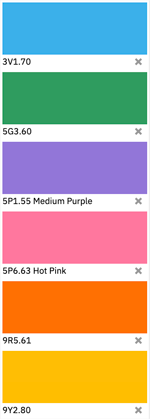 A
A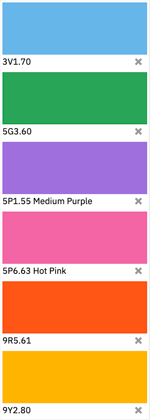 D50
D50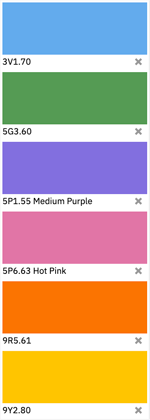 F2
F2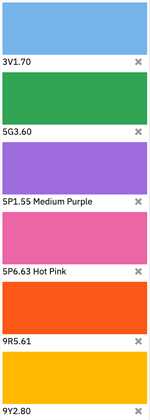 F7
F7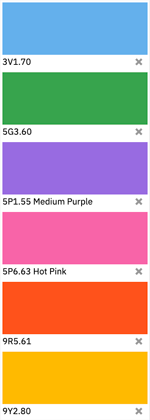 F11
F11Better than reading about it.
- Find three or four saturated colours — violets and deep blues are the most instructive — and add them to the scratchpad with the plus button.
- Add two or three warm colours, a red and an orange, for contrast.
- Switch the illuminant from D50 to A. Watch the scratchpad.
- Now to F11. Then back to D50.
The violets move a great deal; the warm colours barely move at all. That is not the screen being imprecise — it is a real property of those colours, and it is the reason a brand colour in the blue-violet region needs its lighting specified while one in the warm end mostly does not.
How far things actually move
The median colour in this library moves by these amounts when the light changes, against D50 at 2°:
| To | Median | Worst |
|---|---|---|
| D65 | 1.44 | 8.60 |
| F11 | 1.60 | 15.80 |
| A | 3.38 | 17.60 |
| F2 | 3.81 | 10.52 |
All eleven illuminants against both observers, with the worst sample in each case: Inconstancy: the full matrix. What the phenomenon is called and how to work with it: Colour Inconstancy.
Where these tables come from
The illuminant definitions are the CIE ones, integrated across the same 36 wavelength bands the library’s spectra carry, with the white reference computed over the same bands. That keeps the arithmetic self-consistent, and it is why a figure here is reproducible from the files we publish.
Read next
- Colour Inconstancy Index (CII)Which colours move most when the light changes
- Measuring and ViewingThe light you actually judge under
- How Sure Are You?Measuring that light rather than assuming it