Working with ChromaSpot
You can download the ChromaSpot library as a CxF file or export it to Adobe software like Color Books and Swatch.
You'll need to place these files in the appropriate Adobe directories.
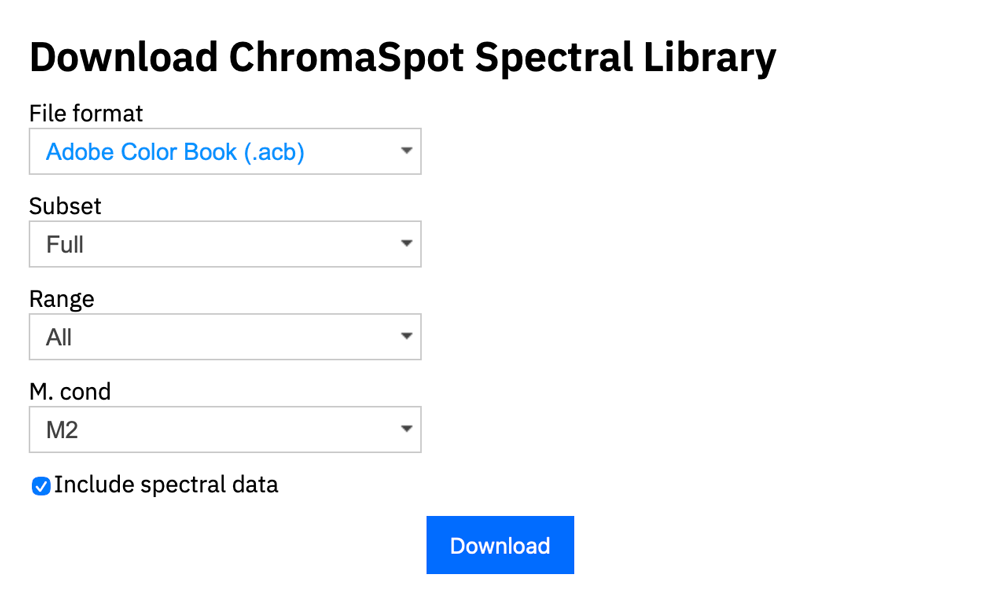
ChromaSpot Library Download Formats:
CxF (Color Exchange Format) — ISO 17972 standard preserving complete spectral data. Use for professional color management systems, RIP software, and ink formulation. Recommended when measurement accuracy must be transferred between systems.
Adobe Color Book (.acb) — Appears in the Swatches panel dropdown alongside Pantone libraries. Requires installation in the application's Color Books folder (location varies by Adobe version). Best for permanent corporate color libraries.
Adobe Swatch Exchange (.ase) — Import directly via the Swatches panel → Load Swatches. No installation needed. Ideal for sharing palettes between projects or users.
Export Options:
Subset: There are three pre-made color sets available, and if you choose colors for your sketchpad, you can export only the ones you've selected. This option is especially recommended for specific projects and can be great as color swatches.
- Full — Contains 4139 samples including 36 Neutrals
- Essential — Contains 1700 samples including 18 Neutrals
- Basic — Contains 400 samples including 9 Neutrals
- Scratchpad — Contains selected samples
Range: Limit to colors reproducible within a specific gamut (Adobe RGB, Coated CMYK, device profiles). Prevents selection of unprintable colors.
M. Condition: Select measurement condition matching your workflow environment:
- M0 — Legacy, unfiltered (deprecated)
- M1 — D50 daylight with UV component
- M2 — UV-cut (LED lighting scenario)
- All — Includes all three conditions; the receiving system can select appropriate data
Include spectral data: Enables recalculation for different viewing conditions. Required for accurate color matching across varied lighting environments.